See a ticker.
Highlight it.
Know the company.

Someone drops $NVDA or ASML.AS into a thread and you have no idea what it is. Highlight it — the price, chart, fundamentals, analyst calls and headlines appear right next to the text.

Add to Chrome — free

Free · No account · Any market

Live This is the real extension running on this page — highlight any ticker.

The Morning Brief Markets · 4 min read

Chips extend the rally as earnings loom

Shares of NVDA extended their rally on continued AI demand, while AAPL edged higher ahead of next week's earnings and MSFT slipped after hours on a cautious cloud outlook.

In Amsterdam, ASML.AS was the session's most-watched name into the close. Retail flow stayed heavy in $TSLA, and index money kept moving into VOO for a third straight week.

A browser page can't reach everything the extension can, so a few numbers in this demo may be stale or approximate. The real extension always shows the complete, up-to-date card.
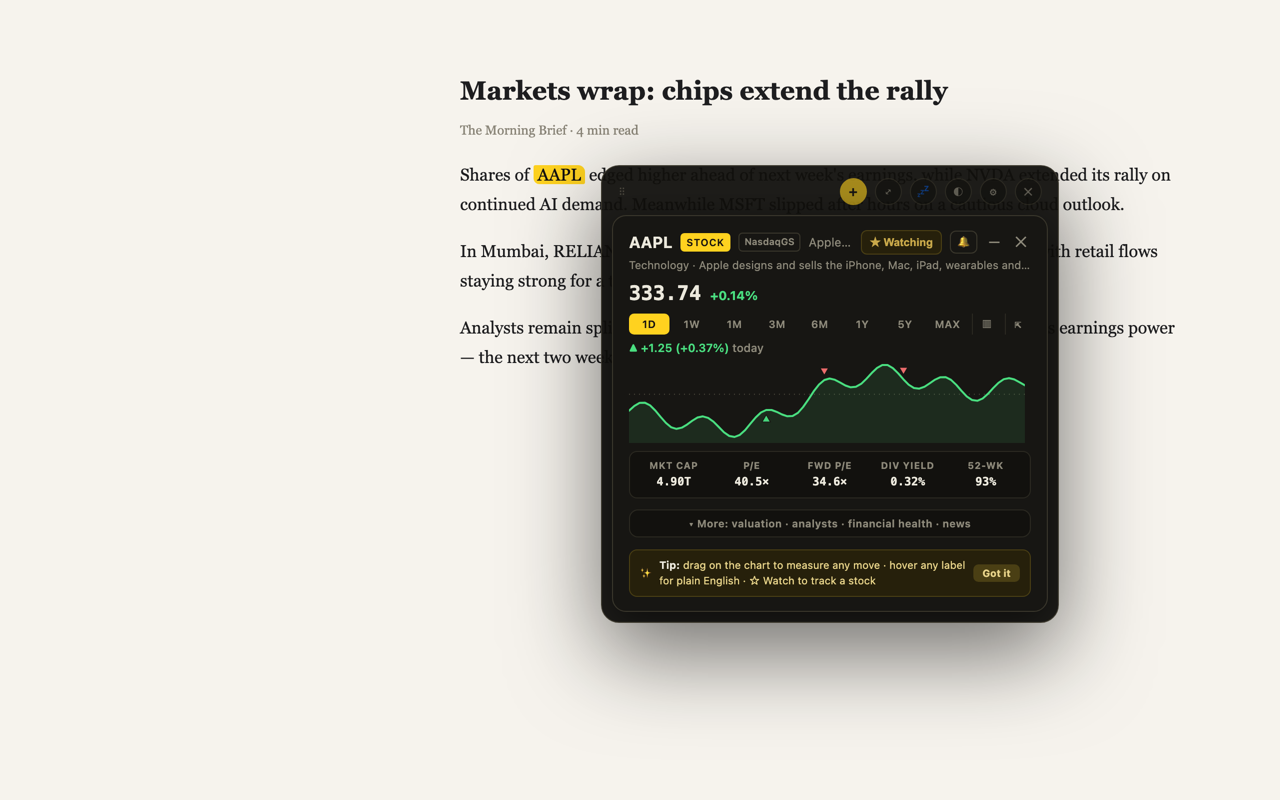
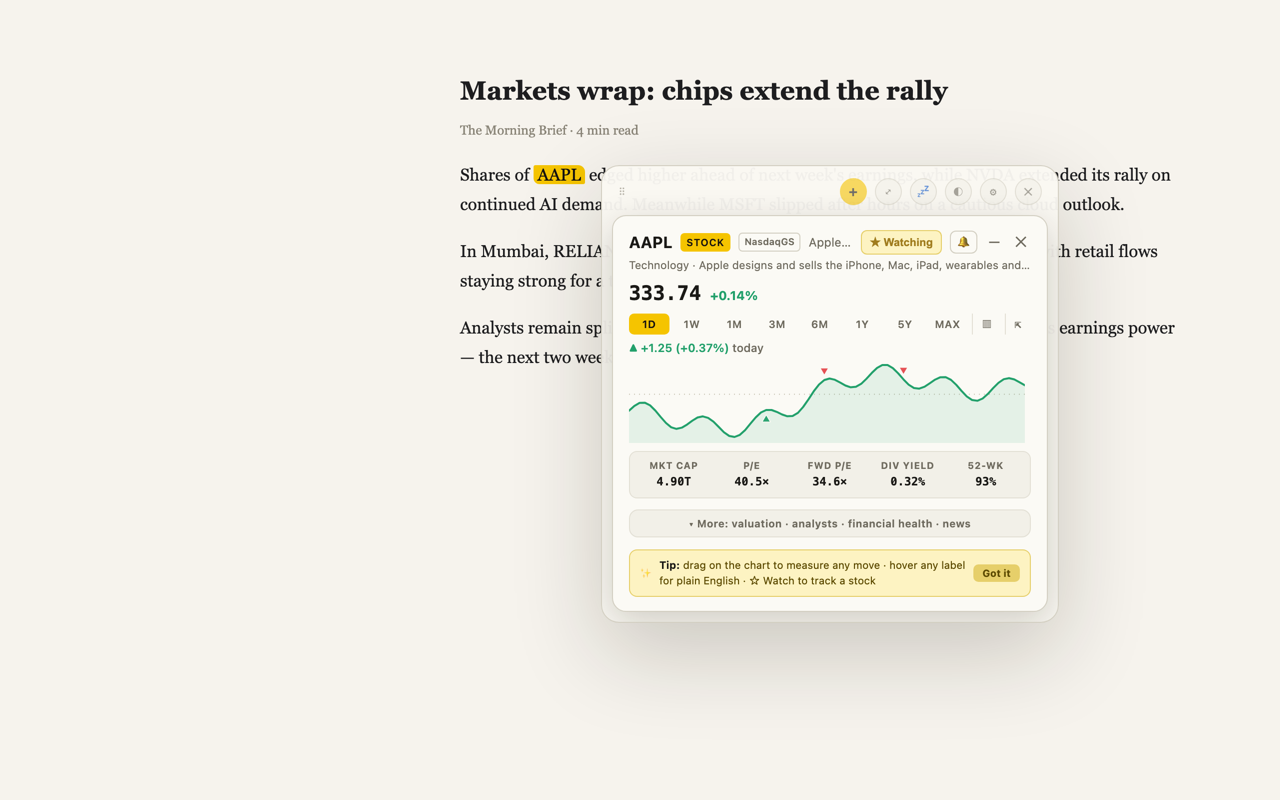
The TickerPop card open next to an article, decoding AAPL The TickerPop card open next to an article, decoding AAPL

This is a preview image — on a bigger screen this page runs the real extension live. A few demo numbers may be stale or approximate; the real extension always shows the complete, up-to-date card.
The card

Then the facts, all of them

Insider trades
Recent buys and sells, decoded from SEC Form 4 filings — real open-market trades told apart from scheduled plans, tax withholding and exercises, with the % of the insider's stake sold.
Chart
1D to all-time, line or candlesticks, with the window's high and low marked where they happened. Drag across it to measure any move — the change in currency and percent, both prices, both dates.
Fundamentals
P/E, forward P/E, EV/EBITDA, margins, growth, 52-week range. Hover any label and it's explained in plain English.
Analyst calls
Consensus, price targets with upside vs today, and the recent firm-by-firm upgrades and downgrades.
Headlines
The latest stories for the company, from sources that cover its home market.

When there's nothing to highlight

Two more ways in

Highlighting is the gesture — it works on any ticker, on any page. These are for the times the page doesn't give you one.

Right-click
Only a company name, or nothing selectable? Right-click anywhere and choose Pop a Ticker, then type. The card opens on the page you're on.
The toolbar
Click the icon for everything you follow — live prices and a day chart on every row. Tap one and it pops where you're reading, not in another tab.

If you want it

Or spread them across a tab

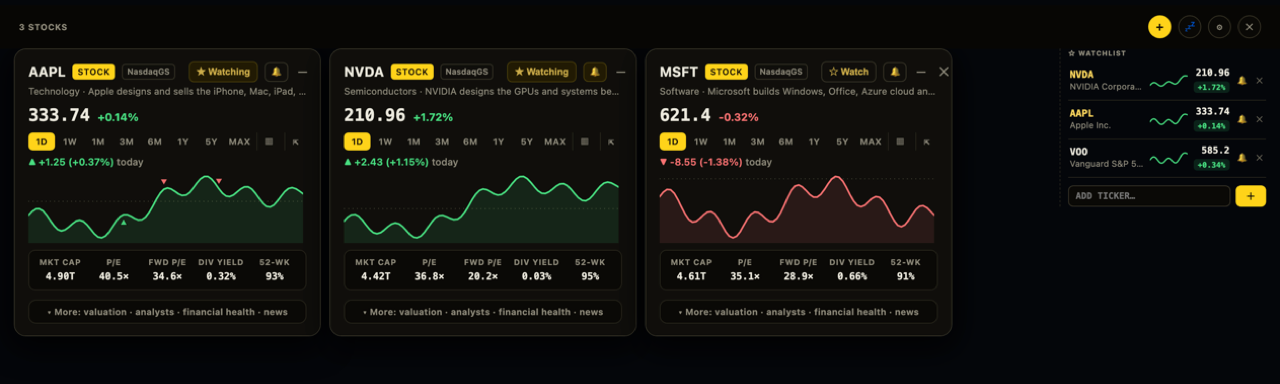
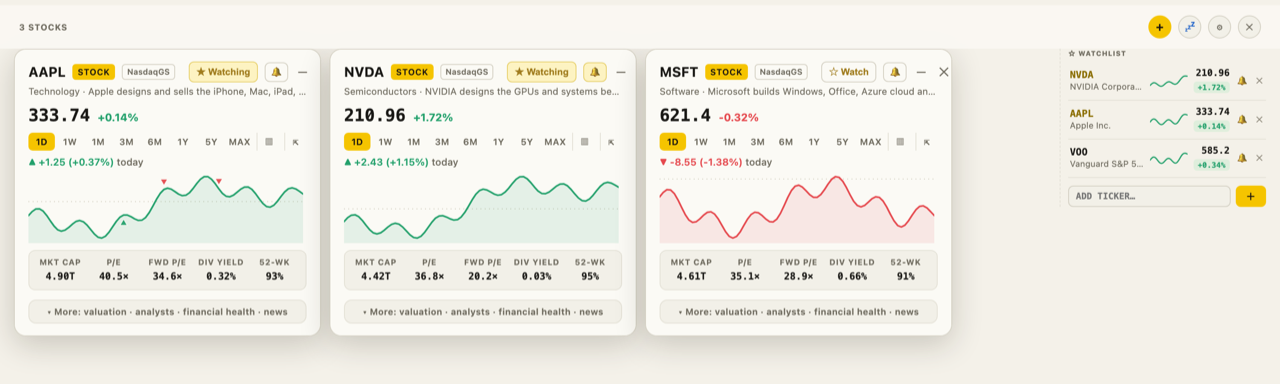
Picks up where you left off — the cards you had open, in the order you left them.
Watchlist and alerts down the side — live prices, above/below and day-move alerts, an earnings-day heads-up.
Make it your start page if you want it every morning.
The TickerPop dashboard: cards side by side with the watchlist panel The TickerPop dashboard in the Paper theme: cards side by side with the watchlist panel

Any market

Works everywhere

New York, Amsterdam, London, Frankfurt, Toronto, Tokyo, Sydney — highlight ASML and you get the Euronext listing, priced in . Suffixes like .AS, .L, .DE, .TO, .T, .AX resolve to the right exchange, every figure shows in that market's own currency, and headlines come from sources that cover it. Stocks, ETFs, mutual funds, indices, crypto. Star anything and the dashboard keeps it — live prices, sparklines, and your last session restored.

Privacy

Only the ticker leaves

Only the ticker you highlight ever leaves the browser — never the page you're on, never your history.
No accounts, no sign-up, no servers of ours — data flows straight from your browser to public market-data sources.
Anonymous feature-usage counts and nothing else — never symbols, never URLs — with an off switch in Settings.
Read the full policy

Questions

FAQ

Is it really free? What's the catch?

It's free, no account needed. It started as a tool I built for myself because I was tired of opening five tabs every time someone mentioned a ticker. If paid extras ever appear, everything that's free today stays free.

Which markets are covered?

Any exchange the data source covers — the US, Europe, the UK, Canada, Japan, Australia and most others via their suffix (.AS, .L, .DE, .TO, .T, .AX …). Stocks, ETFs, mutual funds, indices and crypto, each in its own currency. Data depth varies a little by exchange.

Why doesn't it work on the page I just tried?

Chrome forbids extensions from running on browser pages (chrome://, the Web Store, other extensions' pages, the new-tab page). It works on regular websites — and tabs that were already open when you installed need one refresh.

Is the data real-time?

US quotes are real-time-ish; some international exchanges are delayed 15–20 minutes per their licensing. Short interest is exchange-reported with a ~2-week lag. It's a reading tool, not a trading terminal.

Won't common words like "AI" trigger it?

No — around 120 common all-caps words (AI, CEO, IPO, USA …) are ignored. If you actually want one of those as a ticker, prefix it: $AI.